
Tor Browser
Screenshots
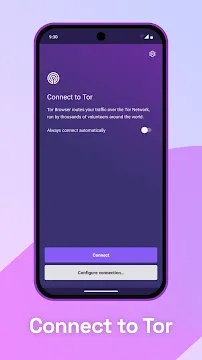
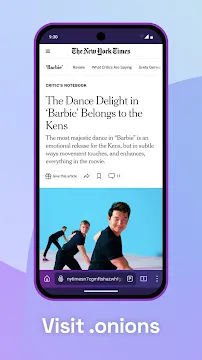
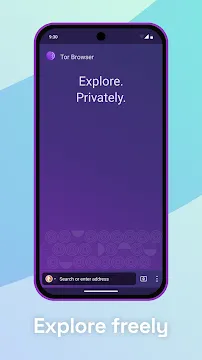
Tor Browser for Android puts private browsing in your pocket. This app reroutes your internet traffic through a global relay network. It hides your location and stops online tracking. Many people think the Tor Browser only works on desktops. That is no longer true. The official Tor Project offers a full-featured Android version. You can find it on Google Play and the Tor Project website. This guide walks you through its features. It also shows you how to use it safely.
What Makes the Tor Browser Different
Most browsers record your digital footprints. Chrome and Firefox save your searches. They log your location. They share data with advertisers. The Tor Browser stops this cycle. It encrypts your connection three times. Then it bounces that traffic through three separate relays. No single relay knows the full path. The first relay sees your IP address but not your destination. The second relay knows neither. The third relay knows your destination but not your real IP.
This design prevents websites from pinpointing you. Your Internet Service Provider also cannot see what you browse. Your employer or school cannot monitor your traffic. The app also blocks trackers by default. It clears cookies automatically. It disables browser features that reveal your screen size or timezone. These small details make fingerprinting very hard.
How to Install and Set Up the App Correctly
From the download page, Click the download Tor Browser apk button. After installation, open the app. Grant minimal permissions. The browser does not need your contacts or location. Tap “Connect” to start the Tor network. Wait a few seconds. The app will show “Connected.” Now you can browse privately.
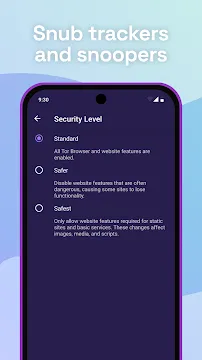
You should also adjust the security slider. Tap the shield icon next to the address bar. Select “Standard” for daily use. Choose “Safer” to disable JavaScript on non-HTTPS sites. Pick “Safest” for high-risk browsing. The safest option blocks most media and fonts. It also blocks JavaScript everywhere. Use this when you handle sensitive information.
Using the Tor Browser Safely for Everyday Tasks
Private browsing does not mean you can ignore common sense. The Tor Browser protects your connection. It does not protect you from phishing or bad downloads. Never enter your real passwords unless necessary. Avoid logging into personal accounts like Facebook or Gmail. Logging in connects your anonymous session to your real identity. That breaks the privacy chain.
You also need to update the app regularly. The Tor Project releases security fixes every few weeks. Enable auto-updates on Google Play. Check the app version in Settings > About Tor Browser. Always use HTTPS versions of websites. The browser includes the HTTPS Everywhere rule set. Look for the green lock icon in the address bar.
- Do not install extra add-ons or extensions.
- Do not maximize the browser window on a unique screen size.
- Do not download files unless you trust the source completely.
- Do not use Tor with BitTorrent on Android.
Optimizing Performance on the Tor Browser
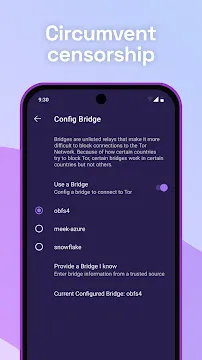
The Tor network is slower than a direct connection. That is the trade-off for privacy. Each relay adds a delay. You can still improve speed. First, use a strong Wi-Fi connection. Cellular networks add more latency. Second, close background apps. Free up RAM for the browser. Third, choose a bridge if your country blocks Tor. Bridges are hidden relays. They disguise your Tor traffic as normal data.
Go to Settings > Bridges. Select “Use a bridge.” Pick “obfs4” for most cases. This bridge works in restrictive networks. It also helps if your ISP throttles Tor traffic. Do not change the default circuit length. Shorter circuits leak your information. Longer circuits make browsing painfully slow. Stick with the default three-hop path.
Is the Tor Browser Legal to Use?
Yes, in the vast majority of countries. The United States, Canada, Europe, and Australia permit Tor use. Some governments restrict or block the network. China, Russia, Iran, and Venezuela actively block Tor. In those countries, using this app may break local laws. Always check your local regulations. The app itself is not illegal. It is a tool for privacy and free speech.
Journalists, activists, and law enforcement use it. Normal people use it to hide shopping habits or medical searches. You do not need a crime to value privacy. That said, Tor does not make you anonymous if you behave carelessly. Logging into real accounts or posting personal photos ruins your anonymity.
Conclusion
The Tor Browser for Android places real anonymity in your hands. It hides your IP address,blocks trackers and encrypts your traffic across three hops. No other mainstream Android browser does this by default. But you must use it wisely. Do not log into personal accounts. Update the app often. Avoid downloading files. Accept slower speeds as the cost of privacy. Use bridges if your country restricts Tor. Remember that the app protects your connection, not your behavior. Stay smart, stay private, and browse without fear.